 Stream My Drone
How to live stream a DJI Air 3
Your DJI Air 3 can send DJI Fly’s RTMP picture to Stream My Drone on a separate phone or to Stream My Drone on a Mac or Windows PC. The controller determines which device runs DJI Fly. Follow the matching setup below, then check the receiver, framing and destination before takeoff.
DJI Fly asks for a microphone on your RC 2 and won’t start the stream? Fix it without buying a mic →
In short
- DJI RC 2 keeps DJI Fly on its built-in screen; a separate phone can receive and forward the feed.
- RC-N2 uses a phone for DJI Fly. Use the desktop workflow here to keep the receiving app on another device.
- The local receiving address belongs in DJI Fly; platform credentials belong in Stream My Drone (phone or computer).
- Camera recording, the controller’s live view and the outgoing RTMP broadcast have separate quality settings.
- Test both the selected camera view and the platform’s viewer page before your flight.
Air 3 controllers: DJI RC 2 or RC-N2
The official Air 3 FAQ lists DJI RC 2 and DJI RC-N2. Check the model printed on your controller: DJI RC, RC-N1 and RC-N3 are different products, so their instructions are not a substitute for an Air 3 compatibility check.
| Controller | Where you fly | Where you receive the stream |
|---|---|---|
| DJI RC 2 | DJI Fly on the built-in screen | Stream My Drone on a separate phone, or Stream My Drone on a computer |
| DJI RC-N2 | DJI Fly on the phone connected by USB | Stream My Drone on a computer for the setup described here |
DJI’s livestream guide limits RC 2 streaming to 720p and requires a connected microphone from DJI Fly v1.16.0. Check the available settings on your controller.
Air 3 with RC 2: live stream without a computer
- Install Stream My Drone on your phoneGet the app from Google Play or the App Store. The phone receives the stream while DJI Fly stays open on the RC 2.
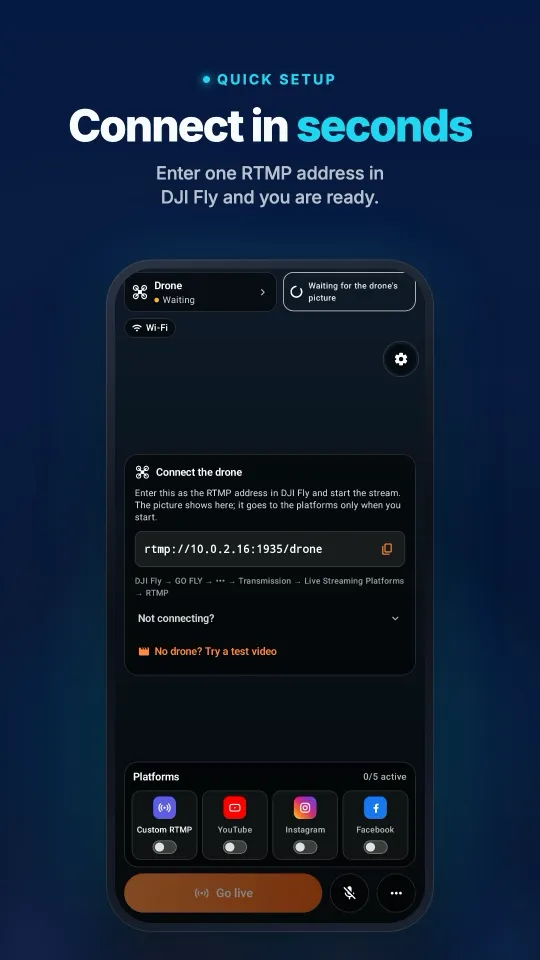
- Connect the RC 2 and phoneJoin both to the same Wi-Fi with internet access. In the field, an Android phone can host the hotspot and receive the stream. Open Stream My Drone after choosing the network; on iPhone, allow local network access when requested.
- Copy the receiving address into DJI FlyCopy the full local receiving address shown by Stream My Drone. In DJI Fly, open GO FLY → ••• → Transmission → Live Streaming Platforms → RTMP and enter it. Use the DJI Fly RTMP guide for the menu walkthrough.
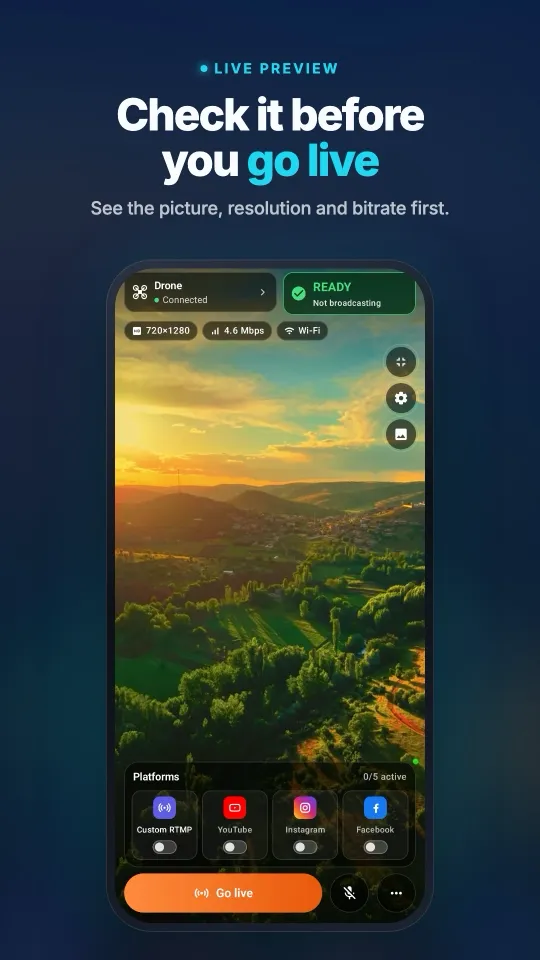
- Start the DJI Fly feed and check the previewStart the feed on the controller, then confirm that a moving drone picture reaches your phone. Check sound too, with any microphone required by DJI Fly connected. Keep Stream My Drone open during the test.
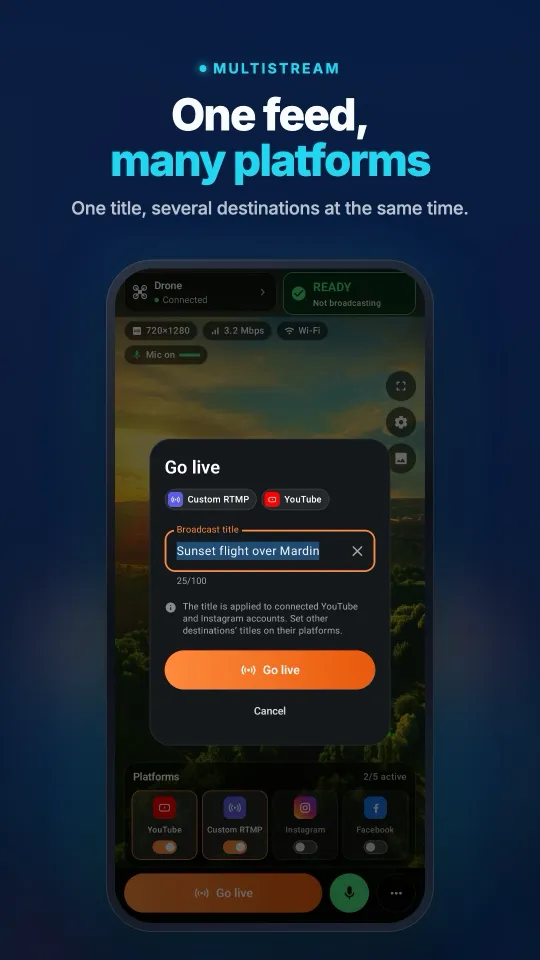
- Choose a destination and confirm publicationAdd a platform in Stream My Drone using its account connection where available, or its server URL and stream key. Start forwarding, then open the platform's live dashboard or viewer page. Complete any Go Live step the platform still requires.
The phone forwards the incoming video without re-encoding it. The preview's crop or blurred background does not turn the outgoing feed into vertical 1080×1920. Use the desktop app when you need that conversion. On iPhone, keep the app in the foreground during setup; continued background streaming depends on Picture in Picture.
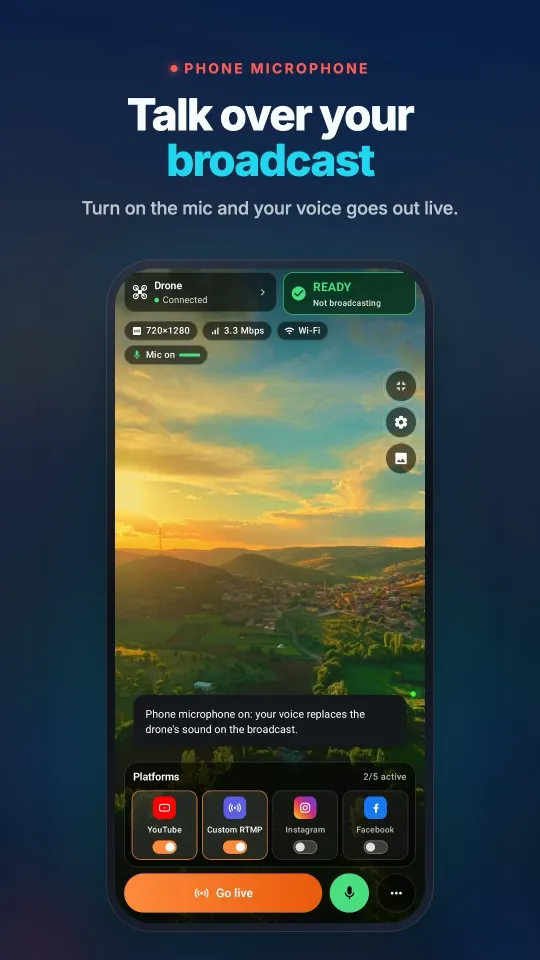
See it on your phoneFrom the DJI Fly connection to a broadcast on several platforms, all on one screen.
Air 3 with RC-N2, or a desktop production setup
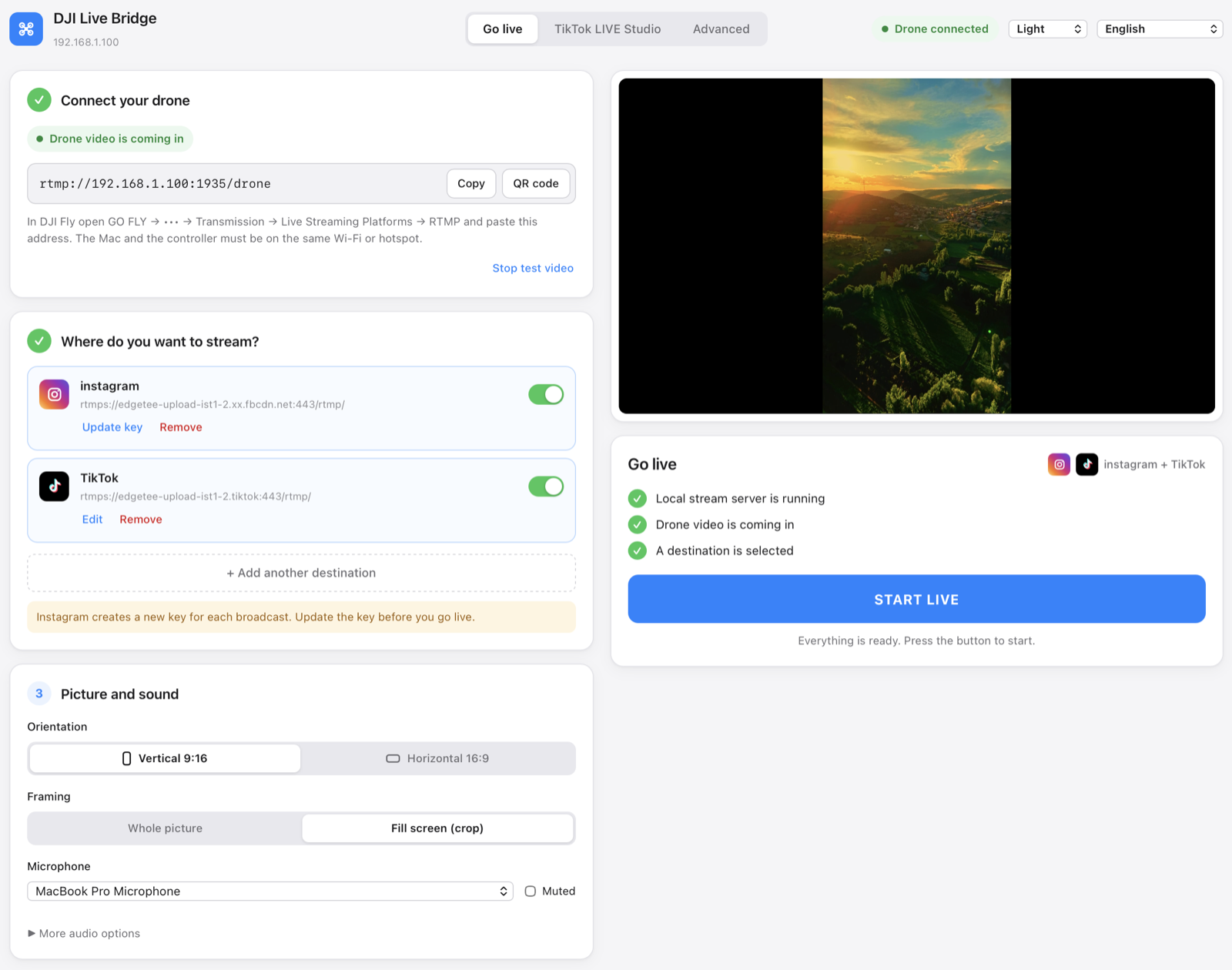
With RC-N2, keep DJI Fly open on the phone attached to the controller. Install Stream My Drone on a Mac or Windows PC and connect that computer and the DJI Fly phone to the same local network. RC 2 can use this desktop route too.
- Find the computer's RTMP addressOpen Stream My Drone and copy the address under Connect your drone. An address such as
rtmp://192.168.1.20:1935/droneis an example; use the one your app displays. - Send DJI Fly to that addressEnter it in DJI Fly's RTMP settings and start the feed. Allow incoming connections on your private network if the computer's firewall asks. Check the preview before adding a destination.
- Set the output and platformChoose landscape for a conventional YouTube or Facebook broadcast, or vertical output for an account using a portrait layout. Add the destination's current server URL and key, start the output, and verify the broadcast on the platform.
Which platform do you want to reach?
| Platform | What to prepare | Detailed guide |
|---|---|---|
| YouTube | An account with live streaming enabled and a prepared broadcast | YouTube setup |
| Access to Live Producer and current RTMPS credentials | Instagram setup | |
| A live broadcast with its server URL and key | Facebook setup | |
| TikTok | RTMP access on your account, or a computer with access to LIVE Studio | TikTok setup |
Platform access belongs to your account. Receiving a drone feed in the app does not grant a stream key or publish a broadcast. For TikTok LIVE Studio, the desktop app also offers a virtual camera. Check each platform's dashboard for the current publishing step.
Plan your wide-angle, tele and vertical shots
Air 3 gives you wide-angle and medium tele cameras. DJI’s camera FAQ also describes 9:16 recording up to 2.7K/60fps. These are camera capabilities; they do not specify the resolution or orientation of the RTMP feed received by your app.
- Rehearse each camera view. While on the ground, select the wide-angle and tele views in DJI Fly and watch the receiver. Check the framing and any transition before using it in a broadcast.
- Frame for the audience. A subject near the edge of a landscape picture can disappear in a desktop portrait crop. Leave room around the subject and inspect the actual outgoing output.
- Check colour at the receiver. Choose an exposure and colour setup that looks right in the received feed. Recording a file for later grading and delivering a ready-to-watch live picture are separate tasks.
For Instagram or TikTok, inspect the actual input dimensions instead of assuming the drone’s vertical recording setting produces a portrait RTMP feed. The phone app’s preview layout does not change the outgoing video; use the desktop output controls when conversion is needed.
Air 3 broadcast quality and mobile data
The drone’s recorded file, the controller’s live view and the video sent to the receiver are separate outputs. Inspect the receiver’s input resolution before choosing output settings. Upscaling changes the size of a picture; it cannot restore detail absent from the incoming feed. Platform processing can introduce another quality change and delay.
- Test before takeoff. Check movement, sound and the platform's viewer page while the drone is on the ground.
- Budget for upload. A continuous 5 Mbps output uses about 2.25 GB per hour before network overhead. Two such destinations need about 10 Mbps combined upload and 4.5 GB per hour.
- Keep the local link strong. Keep the phone or computer near the hotspot. A stable connection matters more than the network's advertised peak speed.
- Watch the actual outgoing framing. On mobile, the preview layout is local. On desktop, check the selected crop or whole-picture output before publishing.
Troubleshooting an Air 3 broadcast
- No RTMP menu: check the controller model, update its firmware and DJI Fly, and look under Transmission. The receiving app cannot add a missing DJI Fly feature.
- Picture is softer than the recording: compare the receiver’s input with the DJI Fly streaming setting. A high-resolution recording mode does not remove the controller’s livestream limit.
- Connection fails: copy the app's address again after a network change. Use a shared local network without guest isolation;
localhoston the controller points to the controller itself. - Picture on the phone, nothing for viewers: check the destination connection, current stream key and the platform's final publishing step. Forwarding bytes alone do not confirm a public broadcast.
- Stream stops after switching iPhone apps: return to Stream My Drone and check Picture in Picture. Without it, iOS can suspend the receiver.
- Choppy broadcast: try one destination first, check cellular upload stability and move the receiver closer to the hotspot.
Sources and related model guides
Official model details: DJI Air 3 FAQ. RTMP procedure and controller limits: DJI Fly App Livestream Operation Guides. Firmware and manuals: DJI Air 3 downloads. Checked on October 25, 2026; available menus can change with firmware.
Compare the Air 3S streaming guide or Mini 5 Pro guide. To send the same picture to several destinations, follow the multistreaming guide.
Questions
Can I live stream an Air 3 without a computer?
With RC 2, use Stream My Drone on a separate phone connected to the same local network. DJI Fly runs on the controller, the phone receives its RTMP feed, and you configure the destination in Stream My Drone.
Can I run the receiver on the phone attached to RC-N2?
That phone runs DJI Fly for flight control. This guide uses a separate computer for Stream My Drone so DJI Fly can stay open. It does not assume the phone can run the flight app and relay app together reliably.
Which address goes into DJI Fly?
The full local receiving address displayed by Stream My Drone (phone or computer). Put the platform's server URL and stream key into the receiving app's destination settings.
Does Stream My Drone turn the video into a vertical broadcast?
The mobile app forwards the video it receives. Its preview layout does not re-encode the outgoing picture. Stream My Drone on a computer offers vertical output conversion.
Why can I see a preview but my audience cannot watch?
The preview proves only that the local drone feed has arrived. Start a destination output, confirm that the platform receives it, and complete any remaining Go Live step there.
Does Air 3 vertical recording guarantee a vertical live stream?
Check the feed that actually reaches the receiver. Camera recording format and RTMP output are separate. The mobile app forwards incoming video, while the desktop app provides output conversion and framing controls.
Take your drone live from your phone
Stream My Drone for Android and iPhone receives the DJI Fly picture and sends it to YouTube, Instagram, Facebook, TikTok, Twitch, Kick or your own server, several at once. One-time purchase, no subscription.
More guides
How to live stream from a drone (step by step, 2026)
How to live stream from a drone to YouTube, Instagram, TikTok or Facebook: what you need, the 4 methods, DJI Fly RTMP setup in 5 steps, internet speed and fixes.
DJI Fly “Livestream error”: the causes and how to fix each one
DJI Fly says “Livestream error” or “Starting livestream failed”? The 8 real causes (RTMPS, stream key, account, microphone, network) and how to fix each one.
Which DJI drones can live stream? The full model and controller list
Every DJI drone that can live stream in DJI Fly, from Mini 2 and Mini 4K to Mavic 4 Pro and Avata 360, which controllers work, and the 720p and microphone limits.
How to live stream a wedding with a drone
Live stream a wedding with a DJI drone for guests who can’t be there: the plan, gear list, private YouTube link, phone or laptop setup, and the safety rules to follow.
DJI RC 2 won’t livestream without a microphone? How to fix “No built-in mic in current device”
DJI Fly 1.16 won't start an RC 2 livestream without a microphone. Why it happens, what works (USB-C mic, AirPods) and a no-hardware fix with an Android phone.
How to live stream a DJI Flip
Live stream DJI Flip with RC 2, RC-N3 or RC-N2: phone and computer RTMP setup, palm and phone-control distinctions, vertical framing and platform checks.
How to live stream a DJI Lito X1
Live stream a DJI Lito X1 with RC 2, RC-N3 or RC-N2: DJI Fly RTMP settings, phone and computer workflows, platform setup and practical troubleshooting.
How to live stream a DJI Lito 1
Live stream a DJI Lito 1 with RC 2, RC-N3 or RC-N2: DJI Fly RTMP settings, phone and computer workflows, platform setup and practical troubleshooting.
How to live stream a DJI Air 3S
Live stream a DJI Air 3S to YouTube, Instagram or Facebook. Choose a controller, connect DJI Fly RTMP to a phone or computer, and check the outgoing picture.
How to live stream a DJI Mavic 4 Pro
Stream your DJI Mavic 4 Pro with RC 2 or RC Pro 2 to a phone or computer. Check DJI Fly RTMP, microphone differences, 720p limits and platform setup.
How to live stream a DJI Mavic 3, Classic or Pro
Live stream a DJI Mavic 3, Classic or Pro with RC-N1 or RC Pro. Learn why DJI RC cannot stream, plus phone receivers, desktop RTMP and quality limits.
How to live stream a DJI Mini 3 Pro
Live stream a DJI Mini 3 Pro using RC-N1, DJI Fly on your phone and Stream My Drone on a computer. Understand why the original DJI RC cannot use this RTMP route.
How to live stream a DJI Mini 3
Set up DJI Mini 3 live streaming through RC-N1 and DJI Fly to Stream My Drone on a computer. Check DJI RC limits, 720p live-view quality and platform publishing.
How to live stream a DJI Mini 5 Pro
Live stream a DJI Mini 5 Pro with RC 2 or RC-N3. Set up DJI Fly RTMP, use a phone or computer, and send your drone feed to YouTube, Instagram or Facebook.
How to live stream a DJI Mini 4 Pro
Live stream a DJI Mini 4 Pro using RC 2 or RC-N2. Follow phone and computer setup, DJI Fly RTMP settings, microphone requirements and platform checks.
Spot and count animals live from your DJI drone
Stream My Drone spots goats, sheep, cows, horses, donkeys and poultry in your drone's live picture, marks them on the stream and counts them, all on your own computer.
DJI Fly RTMP live streaming: the complete setup
How to set up RTMP live streaming in DJI Fly: where the setting is, which address to enter, how to network the controller and computer, and how to fix it.
Why DJI Fly can't live stream to Instagram (and the fix)
DJI Fly has no Instagram option and its RTMP client cannot do the encrypted RTMPS Instagram requires. Here is why, and how to go live on Instagram from a DJI drone anyway.
Turn your DJI drone into your computer's webcam
Turn your DJI drone into a webcam for TikTok LIVE Studio, OBS, Zoom, Google Meet or Teams with the Stream My Drone virtual camera. Setup, ideas and fixes.
How to live stream a DJI Neo
How to live stream a DJI Neo: which control mode works (phone, RC-N3, goggles), RTMP in DJI Fly, and going live on Instagram, TikTok or YouTube with Stream My Drone.
How to live stream a DJI Avata 2
How to live stream FPV footage from a DJI Avata 2: share the Goggles 3 view to DJI Fly on your phone, stream over RTMP and go live on Instagram, TikTok or YouTube.
Live stream your DJI Osmo camera to Instagram, TikTok and more
DJI Mimo can stream Osmo Action, Osmo Pocket and Osmo 360 cameras over RTMP. Send that to Stream My Drone to go live on Instagram, TikTok and YouTube at once.
How to live stream an Osmo Pocket 3 to Instagram and TikTok
How to live stream a DJI Osmo Pocket 3 over RTMP from DJI Mimo to Instagram, TikTok and YouTube at once, and use it as a wireless webcam, with Stream My Drone.
How to live stream an Osmo Action camera to Instagram and TikTok
Live stream a DJI Osmo Action 6, 5 Pro, 4 or 3 over RTMP from DJI Mimo to Instagram, TikTok, YouTube and Twitch at once with Stream My Drone. Setup and settings.
How to go live on TikTok with a DJI drone
Stream a DJI drone live on TikTok from DJI Fly: with a TikTok stream key, or without one through TikTok LIVE Studio and a virtual camera. Settings and fixes.
How to go live on Instagram with a DJI drone
Go live on Instagram from a DJI drone: get the stream URL and key on instagram.com, send DJI Fly's RTMP stream through Stream My Drone, then press Go live.
How to live stream a DJI drone to YouTube
Stream a DJI drone live to YouTube: enable live streaming, copy the stream key from YouTube Studio, send DJI Fly's RTMP through Stream My Drone. Settings and tips.
How to go live on Facebook with a DJI drone
Stream a DJI drone live on Facebook: get the RTMPS server URL and stream key from Live Producer, send DJI Fly's stream through Stream My Drone, and go live.
How to stream a DJI drone on Twitch
Stream a DJI drone live on Twitch: copy your stream key from the Creator Dashboard, add Twitch as a custom RTMP destination in Stream My Drone and go live.
How to stream a DJI drone on Kick
Stream a DJI drone live on Kick: copy the stream URL and key from the Kick dashboard, add them as a custom RTMP destination in Stream My Drone, and go live.
Stream a DJI drone to several platforms at once
Send one DJI drone live stream to TikTok, Instagram, YouTube, Facebook, Twitch and Kick at the same time with Stream My Drone — free, local, no restream service.
Stream My Drone vs Restream: which one for your drone?
Streaming a DJI drone to several platforms: Restream's cloud relay or Stream My Drone on your own computer? Cost, watermark, Instagram, vertical video and when each one wins.
Stream a DJI drone without setting up NGINX and OBS
The usual way to get DJI Fly into OBS is an NGINX RTMP server, a config file and a media source. Here is what that setup involves, and the one-app way to skip it.