 DJI Live Bridge
How to live stream a DJI Mini 4 Pro
The DJI Mini 4 Pro can send its live view from DJI Fly over RTMP. With DJI RC 2, receive it on a separate phone using Stream My Drone, or on a computer using DJI Live Bridge. With RC-N2, the computer route below keeps DJI Fly open on your flight phone. Then configure YouTube, Instagram, Facebook or another destination in the receiving app.
In short
- DJI Fly sends the local feed; Stream My Drone or DJI Live Bridge forwards it to your platform.
- RC 2 works with a separate receiving phone; RC-N2 uses your phone for DJI Fly, with a computer receiving in this guide.
- The controller’s RTMP output can be lower resolution than its live view or the file recorded on the drone.
- The mobile app forwards the incoming video; desktop output can convert it to a vertical format.
- Check the platform’s viewer page after starting the output: forwarding and publication are separate steps.
Can the DJI Mini 4 Pro live stream?
The standard controller choices are DJI RC 2 and RC-N2. DJI Fly runs on the RC 2’s built-in screen or on the phone attached to RC-N2. Both routes can send a feed to a separate receiver.
| Controller | Where DJI Fly runs | Stream quality (DJI) | Watch out for |
|---|---|---|---|
| DJI RC 2 | On the controller's own screen | 720p | Microphone required from DJI Fly v1.16.0 |
| DJI RC-N2 | On your phone | 1080p or 720p; Android 5/3 Mbps, iOS 2/1 Mbps | The phone's Wi-Fi must be on the same network as the computer |
According to DJI’s livestream guide, RC 2 is limited to 720p and needs a connected microphone from DJI Fly v1.16.0. RC-N2 phone options are 1080p or 720p, with Android at 5/3 Mbps and iOS at 2/1 Mbps; availability depends on the transmission frame rate.
Set up the Mini 4 Pro stream on a computer
- Put everything on one networkJoin the DJI RC 2 (or, with the RC-N2, your phone) and the computer to the same Wi-Fi, or to one phone hotspot.
- Open DJI Live BridgeInstall DJI Live Bridge on a Mac or Windows PC. The Connect your drone step shows an address like
rtmp://192.168.1.20:1935/drone. - Plug in a microphone (DJI RC 2 only)Without one, DJI Fly on the RC 2 refuses to start the stream.
- Enter the address in DJI FlyGO FLY → ••• → Transmission → Live Streaming Platforms → RTMP, type the address and start. The preview appears in the app within seconds.
- Add your platforms and go liveAdd the platform with its current stream URL and key. Choose the desktop output format, start the output, and check the platform dashboard. Complete any additional Go Live step before telling viewers the broadcast has started.
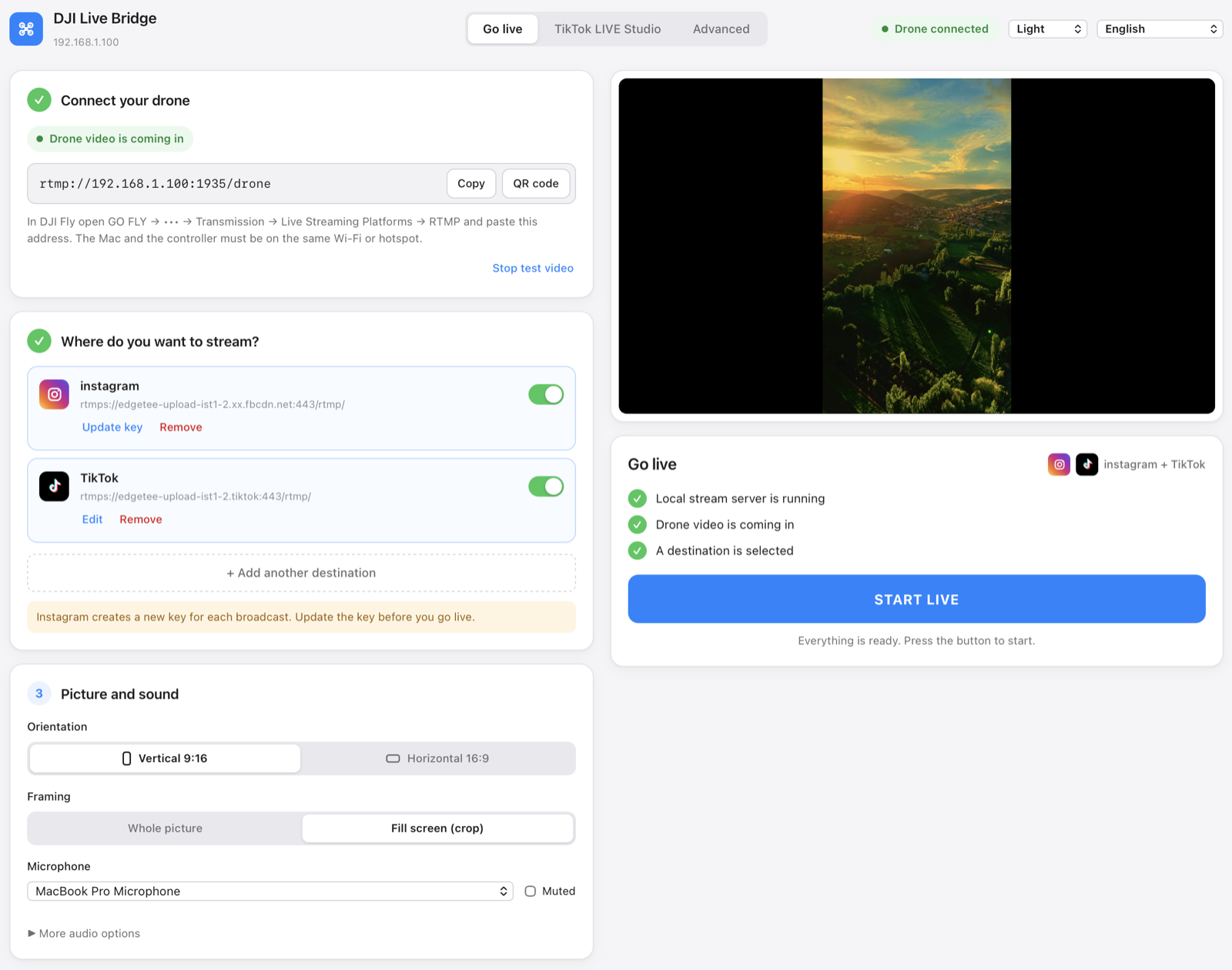
For a phone-only RC 2 setup, follow the next section. For screenshots and more network detail, see the DJI Fly RTMP guide.
Mini 4 Pro with RC 2: stream from a phone without a computer
Leave DJI Fly on the RC 2 and use a separate phone as the receiver. Install Stream My Drone from Google Play or the App Store.
- Choose the local networkConnect the RC 2 and phone to the same Wi-Fi with internet access. In the field, an Android phone can host the hotspot and receive the feed. On iPhone, allow local network access when requested.
- Read the receiving address from the appOpen Stream My Drone after connecting to the network. Use the full address it shows; do not reuse an example IP address from a guide.
- Start the DJI Fly feedEnter that address in DJI Fly → GO FLY → ••• → Transmission → Live Streaming Platforms → RTMP. Connect a microphone if requested, start the feed and check the phone preview.
- Add the platform in Stream My DroneUse an account connection where available, or enter the platform server URL and stream key in the destination settings. The local receiving address belongs in DJI Fly; the platform credentials belong here.
- Check that viewers can watchStart forwarding and inspect the platform dashboard or viewer page. Complete any remaining Go Live step. A preview or an active transport connection alone does not confirm publication.
The mobile app forwards the incoming picture without re-encoding. Cropping its preview does not produce a vertical 1080×1920 output; use the desktop app for that conversion. Keep the iPhone app in the foreground during setup; background streaming depends on Picture in Picture.
Which platform do you want to reach?
| Platform | What to prepare | Detailed guide |
|---|---|---|
| YouTube | An account with live streaming enabled and a prepared broadcast | YouTube setup |
| Access to Live Producer and current RTMPS credentials | Instagram setup | |
| A live broadcast with its server URL and key | Facebook setup | |
| TikTok | RTMP access on your account, or a computer with access to LIVE Studio | TikTok setup |
Platform access belongs to your account. Receiving a drone feed in the app does not grant a stream key or publish a broadcast. For TikTok LIVE Studio, the desktop app also offers a virtual camera. Check each platform's dashboard for the current publishing step.
Getting the best picture from a Mini 4 Pro
- 720p is the ceiling on the DJI RC 2. DJI Live Bridge scales it to 1080×1920 for vertical platforms and shows the real input resolution, so you know what you are sending.
- On the RC-N2, an Android phone helps. DJI lists 5 or 3 Mbps for Android and only 2 or 1 Mbps for iOS, which shows in fast motion.
- Keep the link short. The stream travels from the controller over Wi-Fi to the computer; a 5 GHz network or a hotspot next to the computer avoids drops.
- Vertical or horizontal. The Mini 4 Pro films landscape by default. For Instagram and TikTok, Whole picture keeps the full frame with a blurred fill; Fill screen crops to fill the phone.
When it does not work
- DJI Fly will not start the stream on the RC 2: plug in a microphone first.
- DJI Fly says it cannot connect: the controller (or phone) and the computer are on different networks, or the computer got a new address. Copy the address from the app again.
- No RTMP option: check that the controller is RC 2 rather than DJI RC; update DJI Fly and the controller firmware. The receiving app cannot add a missing RTMP menu.
- Preview works but the platform does not: check the destination URL, current key and any final publishing step in the platform dashboard.
Sources and the Mini 5 Pro guide
Official references: DJI Fly App Livestream Operation Guides and DJI Mini 4 Pro FAQ. Checked on October 21, 2026. Menus and available settings can change with firmware.
Looking for the newer model? The Mini 5 Pro live streaming guide covers RC 2 and RC-N3, phone reception and the desktop route.
Questions
Can the DJI Mini 4 Pro stream to Instagram?
Not from DJI Fly alone, because Instagram needs an encrypted RTMPS connection and DJI Fly sends plain RTMP. Send DJI Fly's stream to DJI Live Bridge, which forwards it to Instagram over RTMPS in vertical 1080×1920.
Why does the DJI RC 2 need a microphone to live stream?
DJI lists a connected microphone as a streaming requirement on RC 2 from DJI Fly v1.16.0. Connect a compatible microphone and check that DJI Fly recognises it before starting.
What resolution does the Mini 4 Pro stream in?
720p with the DJI RC 2. With the RC-N2, DJI Fly offers 1080p or 720p, at 5 or 3 Mbps on Android and 2 or 1 Mbps on iOS.
Can I stream the Mini 4 Pro without a computer?
With RC 2, use Stream My Drone on a separate Android phone or iPhone on the same local network. With RC-N2, this guide uses DJI Live Bridge on a computer so DJI Fly can stay open on your flight phone.
Can I stream to Instagram and TikTok at the same time?
You can add both as destinations if your accounts provide the required streaming access. Each destination uses upload bandwidth. On desktop the picture is encoded once; on mobile the incoming picture is forwarded without re-encoding.
Try it with your drone
DJI Live Bridge is free and open source, for macOS and Windows. FFmpeg is built in, so there is nothing else to install.
More guides
How to live stream a DJI Mini 5 Pro
Live stream a DJI Mini 5 Pro with RC 2 or RC-N3. Set up DJI Fly RTMP, use a phone or computer, and send your drone feed to YouTube, Instagram or Facebook.
Spot and count animals live from your DJI drone
DJI Live Bridge spots goats, sheep, cows, horses, donkeys and poultry in your drone's live picture, marks them on the stream and counts them, all on your own computer.
DJI Fly RTMP live streaming: the complete setup
How to set up RTMP live streaming in DJI Fly: where the setting is, which address to enter, how to network the controller and computer, and how to fix it.
Why DJI Fly can't live stream to Instagram (and the fix)
DJI Fly has no Instagram option and its RTMP client cannot do the encrypted RTMPS Instagram requires. Here is why, and how to go live on Instagram from a DJI drone anyway.
Turn your DJI drone into your computer's webcam
Turn your DJI drone into a webcam for TikTok LIVE Studio, OBS, Zoom, Google Meet or Teams with the DJI Live Bridge virtual camera. Setup, ideas and fixes.
How to live stream a DJI Neo
How to live stream a DJI Neo: which control mode works (phone, RC-N3, goggles), RTMP in DJI Fly, and going live on Instagram, TikTok or YouTube with DJI Live Bridge.
How to live stream a DJI Avata 2
How to live stream FPV footage from a DJI Avata 2: share the Goggles 3 view to DJI Fly on your phone, stream over RTMP and go live on Instagram, TikTok or YouTube.
Live stream your DJI Osmo camera to Instagram, TikTok and more
DJI Mimo can stream Osmo Action, Osmo Pocket and Osmo 360 cameras over RTMP. Send that to DJI Live Bridge to go live on Instagram, TikTok and YouTube at once.
How to live stream an Osmo Pocket 3 to Instagram and TikTok
How to live stream a DJI Osmo Pocket 3 over RTMP from DJI Mimo to Instagram, TikTok and YouTube at once, and use it as a wireless webcam, with DJI Live Bridge.
How to live stream an Osmo Action camera to Instagram and TikTok
Live stream a DJI Osmo Action 6, 5 Pro, 4 or 3 over RTMP from DJI Mimo to Instagram, TikTok, YouTube and Twitch at once with DJI Live Bridge. Setup and settings.
How to go live on TikTok with a DJI drone
Stream a DJI drone live on TikTok from DJI Fly: with a TikTok stream key, or without one through TikTok LIVE Studio and a virtual camera. Settings and fixes.
How to go live on Instagram with a DJI drone
Go live on Instagram from a DJI drone: get the stream URL and key on instagram.com, send DJI Fly's RTMP stream through DJI Live Bridge, then press Go live.
How to live stream a DJI drone to YouTube
Stream a DJI drone live to YouTube: enable live streaming, copy the stream key from YouTube Studio, send DJI Fly's RTMP through DJI Live Bridge. Settings and tips.
How to go live on Facebook with a DJI drone
Stream a DJI drone live on Facebook: get the RTMPS server URL and stream key from Live Producer, send DJI Fly's stream through DJI Live Bridge, and go live.
How to stream a DJI drone on Twitch
Stream a DJI drone live on Twitch: copy your stream key from the Creator Dashboard, add Twitch as a custom RTMP destination in DJI Live Bridge and go live.
How to stream a DJI drone on Kick
Stream a DJI drone live on Kick: copy the stream URL and key from the Kick dashboard, add them as a custom RTMP destination in DJI Live Bridge, and go live.
Stream a DJI drone to several platforms at once
Send one DJI drone live stream to TikTok, Instagram, YouTube, Facebook, Twitch and Kick at the same time with DJI Live Bridge — free, local, no restream service.
DJI Live Bridge vs Restream: which one for your drone?
Streaming a DJI drone to several platforms: Restream's cloud relay or DJI Live Bridge on your own computer? Cost, watermark, Instagram, vertical video and when each one wins.
Stream a DJI drone without setting up NGINX and OBS
The usual way to get DJI Fly into OBS is an NGINX RTMP server, a config file and a media source. Here is what that setup involves, and the one-app way to skip it.