 DJI Live Bridge
How to go live on TikTok with a DJI drone
DJI Fly cannot stream to TikTok by itself, but it can send RTMP to a computer. DJI Live Bridge receives that stream and gets it to TikTok in one of two ways: directly with a TikTok server URL and stream key, if your account has one, or through TikTok LIVE Studio, where the drone appears as a camera and no stream key is needed.
In short
- You need a DJI drone whose DJI Fly app offers RTMP under Live Streaming Platforms, and a Mac or Windows PC on the same Wi-Fi or hotspot as the controller.
- With a stream key: add a TikTok destination in DJI Live Bridge and press START LIVE.
- Without a stream key: select “DJI Live Bridge Camera” as a camera source in TikTok LIVE Studio and go live from there.
- TikTok expects vertical video; the app sends 1080×1920 at 30 fps and fills the empty space with a blurred copy of the picture.
- TikTok decides who may go LIVE and who gets a stream key; the requirements depend on your account and region.
What you need
- A DJI drone and controller where DJI Fly shows RTMP under Live Streaming Platforms. If your DJI Fly version has it, the drone works — the app never talks to the drone itself.
- A Mac (macOS 13 or newer, Apple Silicon or Intel) or a Windows 10/11 PC with DJI Live Bridge installed.
- The controller and the computer on the same Wi-Fi network, or both on your phone's hotspot.
- A TikTok account that can go LIVE. For the direct method it also needs RTMP access (a server URL and stream key); for the LIVE Studio method it needs access to TikTok LIVE Studio.
Step 1: send the drone's picture to your computer
- Open DJI Live BridgeThe Go live tab shows an address such as
rtmp://192.168.1.20:1935/droneand a QR code. - Open the RTMP screen in DJI FlyGO FLY → ••• → Transmission → Live Streaming Platforms → RTMP.
- Paste the address and startWhen the picture arrives, the first step in the app turns green and the live preview appears.
No drone at hand? Use Try with a video file in the app to rehearse the whole path with a recorded clip.
Method A: go live on TikTok with a stream key
Use this method if TikTok shows you a server URL and stream key. Not every account gets one; if you cannot find it, use Method B.
- Copy the server URL and stream key from TikTokOpen the stream key screen in TikTok LIVE Center or TikTok LIVE Studio and copy the Server URL (it looks like
rtmp://push-rtmp-….tiktokcdn.com/game/) and the Stream key. - Add a TikTok destinationIn DJI Live Bridge, under Where do you want to stream?, choose TikTok and paste both values. The key is stored in your system's credential vault, not in a file.
- Keep the picture verticalUnder Picture and sound leave Vertical 9:16 on. Whole picture fills the empty space with a blurred copy of the shot; Fill screen crops instead.
- Press START LIVEThe button unlocks once the local server runs, drone video is arriving and a destination is selected. The destination card then shows Live.
- Check the stream on TikTokConfirm in TikTok that the stream is being received and is public. Press End stream in the app when you are done.
Method B: TikTok LIVE Studio without a stream key
TikTok LIVE Studio is TikTok's own desktop app. You sign in with your TikTok account, so it does not need RTMP access — it only needs a camera. DJI Live Bridge provides one called DJI Live Bridge Camera.
- Enable the virtual cameraIn the TikTok LIVE Studio tab press Enable Virtual Camera. On a Mac the app must be in the Applications folder, and macOS asks once for approval under System Settings → General → Login Items & Extensions → Camera Extensions.
- Start the cameraWhen the card reads Ready to start, press Start Virtual Camera.
- Add the camera in LIVE StudioAdd a Camera source and pick DJI Live Bridge Camera.
- Set up the soundSet that source's audio capture to None and choose one microphone in LIVE Studio. The camera carries video only, so you never get double audio.
- Go livePress Go Live in TikTok LIVE Studio. Going live always stays in your hands.
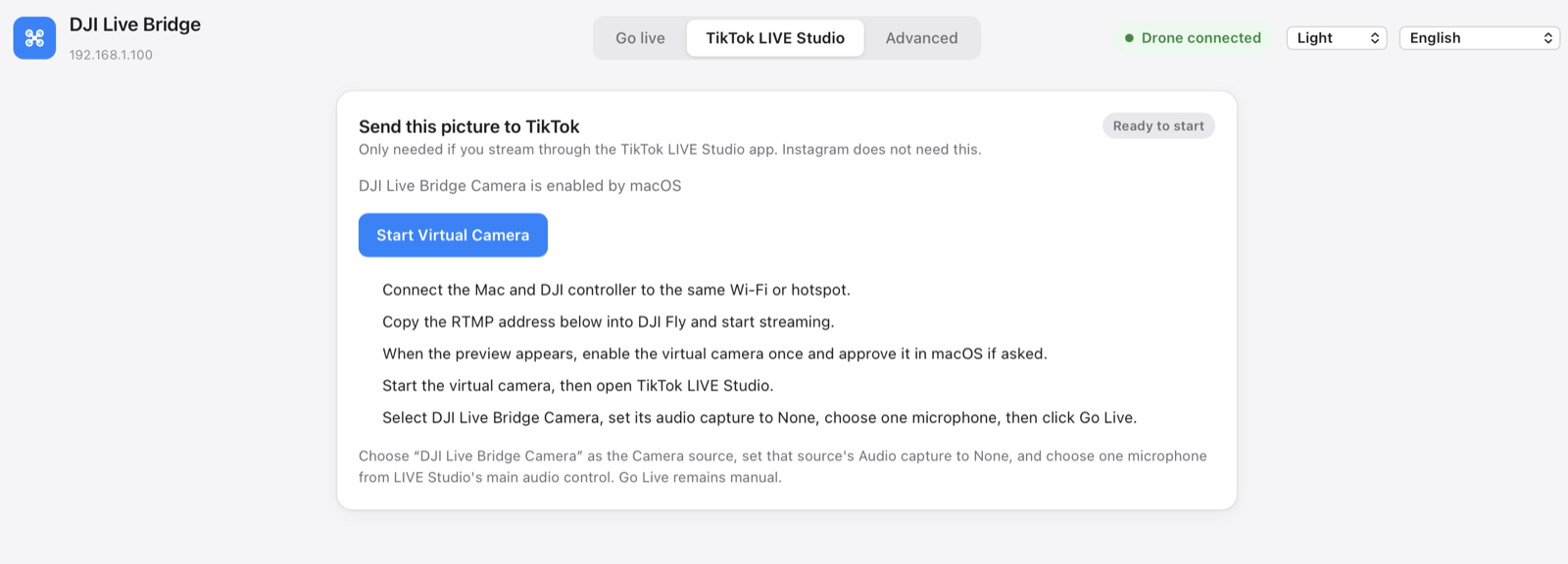
The built-in Windows virtual camera has been tested with TikTok LIVE Studio. Select “DJI Live Bridge Camera” as the video source. The optional OBS integration is also available for broadcasts using OBS scenes.
Recommended settings for TikTok
| Setting | Value | Why |
|---|---|---|
| Orientation | Vertical 9:16, 1080×1920 | TikTok is watched on phones in portrait. |
| Frame rate | 30 fps | Smooth, and light on upload bandwidth. |
| Bitrate | 6 Mbps CBR | A constant rate keeps the ingest server happy. |
| Video codec | H.264 High, 2-second keyframes | What live ingest servers expect. |
| Framing | Whole picture | No black bars and no lost edges. |
The app uses these values automatically; you only choose the orientation and framing. Plan for at least 10 Mbps of steady upload per destination.
When it does not work
- The preview stays empty: the controller and the computer are probably on different networks. Put both on the same Wi-Fi or hotspot and check the address in DJI Fly.
- DJI Fly will not start streaming on the RC 2: some DJI Fly versions want a microphone connected to the controller first.
- The TikTok card says Connection failed: copy the server URL and key again — a key can expire or be reset.
- The camera is missing in LIVE Studio: start the virtual camera first, then restart LIVE Studio so it lists cameras again.
- The picture is 720p: the controller often sends 720p. The app shows the real input resolution and does not pretend it is native 1080p.
Questions
Can I go live on TikTok from a DJI drone without a stream key?
Yes. Use TikTok LIVE Studio and pick DJI Live Bridge Camera as its camera source. You sign in to LIVE Studio with your own account, so no server URL or stream key is needed.
Why don't I have a TikTok stream key?
TikTok gives RTMP stream keys only to some accounts, and the rules vary by region and change over time. TikTok LIVE Studio is the alternative when you have none.
Can I stream to TikTok and Instagram at the same time?
Yes, with stream keys for both. DJI Live Bridge encodes the picture once and sends it to every enabled destination; one failing destination does not stop the others.
Does DJI Live Bridge sign in to my TikTok account?
No. It never signs in to a platform and never presses Go Live for you; it only sends video to the address you give it, or provides a camera to LIVE Studio.
Is DJI Live Bridge free?
Yes. It is free and open source under the MIT licence, and is not affiliated with DJI or TikTok.
Try it with your drone
DJI Live Bridge is free and open source, for macOS and Windows. FFmpeg is built in, so there is nothing else to install.
More guides
How to live stream a DJI Mini 5 Pro
Live stream a DJI Mini 5 Pro with RC 2 or RC-N3. Set up DJI Fly RTMP, use a phone or computer, and send your drone feed to YouTube, Instagram or Facebook.
How to live stream a DJI Mini 4 Pro
Live stream a DJI Mini 4 Pro using RC 2 or RC-N2. Follow phone and computer setup, DJI Fly RTMP settings, microphone requirements and platform checks.
Spot and count animals live from your DJI drone
DJI Live Bridge spots goats, sheep, cows, horses, donkeys and poultry in your drone's live picture, marks them on the stream and counts them, all on your own computer.
DJI Fly RTMP live streaming: the complete setup
How to set up RTMP live streaming in DJI Fly: where the setting is, which address to enter, how to network the controller and computer, and how to fix it.
Why DJI Fly can't live stream to Instagram (and the fix)
DJI Fly has no Instagram option and its RTMP client cannot do the encrypted RTMPS Instagram requires. Here is why, and how to go live on Instagram from a DJI drone anyway.
Turn your DJI drone into your computer's webcam
Turn your DJI drone into a webcam for TikTok LIVE Studio, OBS, Zoom, Google Meet or Teams with the DJI Live Bridge virtual camera. Setup, ideas and fixes.
How to live stream a DJI Neo
How to live stream a DJI Neo: which control mode works (phone, RC-N3, goggles), RTMP in DJI Fly, and going live on Instagram, TikTok or YouTube with DJI Live Bridge.
How to live stream a DJI Avata 2
How to live stream FPV footage from a DJI Avata 2: share the Goggles 3 view to DJI Fly on your phone, stream over RTMP and go live on Instagram, TikTok or YouTube.
Live stream your DJI Osmo camera to Instagram, TikTok and more
DJI Mimo can stream Osmo Action, Osmo Pocket and Osmo 360 cameras over RTMP. Send that to DJI Live Bridge to go live on Instagram, TikTok and YouTube at once.
How to live stream an Osmo Pocket 3 to Instagram and TikTok
How to live stream a DJI Osmo Pocket 3 over RTMP from DJI Mimo to Instagram, TikTok and YouTube at once, and use it as a wireless webcam, with DJI Live Bridge.
How to live stream an Osmo Action camera to Instagram and TikTok
Live stream a DJI Osmo Action 6, 5 Pro, 4 or 3 over RTMP from DJI Mimo to Instagram, TikTok, YouTube and Twitch at once with DJI Live Bridge. Setup and settings.
How to go live on Instagram with a DJI drone
Go live on Instagram from a DJI drone: get the stream URL and key on instagram.com, send DJI Fly's RTMP stream through DJI Live Bridge, then press Go live.
How to live stream a DJI drone to YouTube
Stream a DJI drone live to YouTube: enable live streaming, copy the stream key from YouTube Studio, send DJI Fly's RTMP through DJI Live Bridge. Settings and tips.
How to go live on Facebook with a DJI drone
Stream a DJI drone live on Facebook: get the RTMPS server URL and stream key from Live Producer, send DJI Fly's stream through DJI Live Bridge, and go live.
How to stream a DJI drone on Twitch
Stream a DJI drone live on Twitch: copy your stream key from the Creator Dashboard, add Twitch as a custom RTMP destination in DJI Live Bridge and go live.
How to stream a DJI drone on Kick
Stream a DJI drone live on Kick: copy the stream URL and key from the Kick dashboard, add them as a custom RTMP destination in DJI Live Bridge, and go live.
Stream a DJI drone to several platforms at once
Send one DJI drone live stream to TikTok, Instagram, YouTube, Facebook, Twitch and Kick at the same time with DJI Live Bridge — free, local, no restream service.
DJI Live Bridge vs Restream: which one for your drone?
Streaming a DJI drone to several platforms: Restream's cloud relay or DJI Live Bridge on your own computer? Cost, watermark, Instagram, vertical video and when each one wins.
Stream a DJI drone without setting up NGINX and OBS
The usual way to get DJI Fly into OBS is an NGINX RTMP server, a config file and a media source. Here is what that setup involves, and the one-app way to skip it.