 DJI Live Bridge
How to live stream an Osmo Action camera to Instagram and TikTok
Osmo Action cameras stream over RTMP from DJI Mimo at up to 1080p — from a helmet, a handlebar, a car or a tripod. DJI Mimo alone reaches Facebook, YouTube or an RTMP address; send that RTMP stream to DJI Live Bridge on a computer and the same picture goes to Instagram, TikTok, YouTube, Twitch or Kick at once.
In short
- Osmo Action 6, 5 Pro, 4 and 3 stream RTMP from DJI Mimo (1.2.20 or later) at 480p, 720p or 1080p, up to 6 Mbps.
- The camera joins a Wi-Fi network itself; put it on the same network as the computer, or on a hotspot both share.
- DJI Live Bridge sends the stream to several platforms at once, including Instagram over RTMPS.
- Vertical 1080×1920 with a blurred fill keeps the full action shot on phone screens.
- The virtual camera also makes the Osmo Action a wireless camera for OBS, Zoom or TikTok LIVE Studio.
Set up the Osmo Action live stream
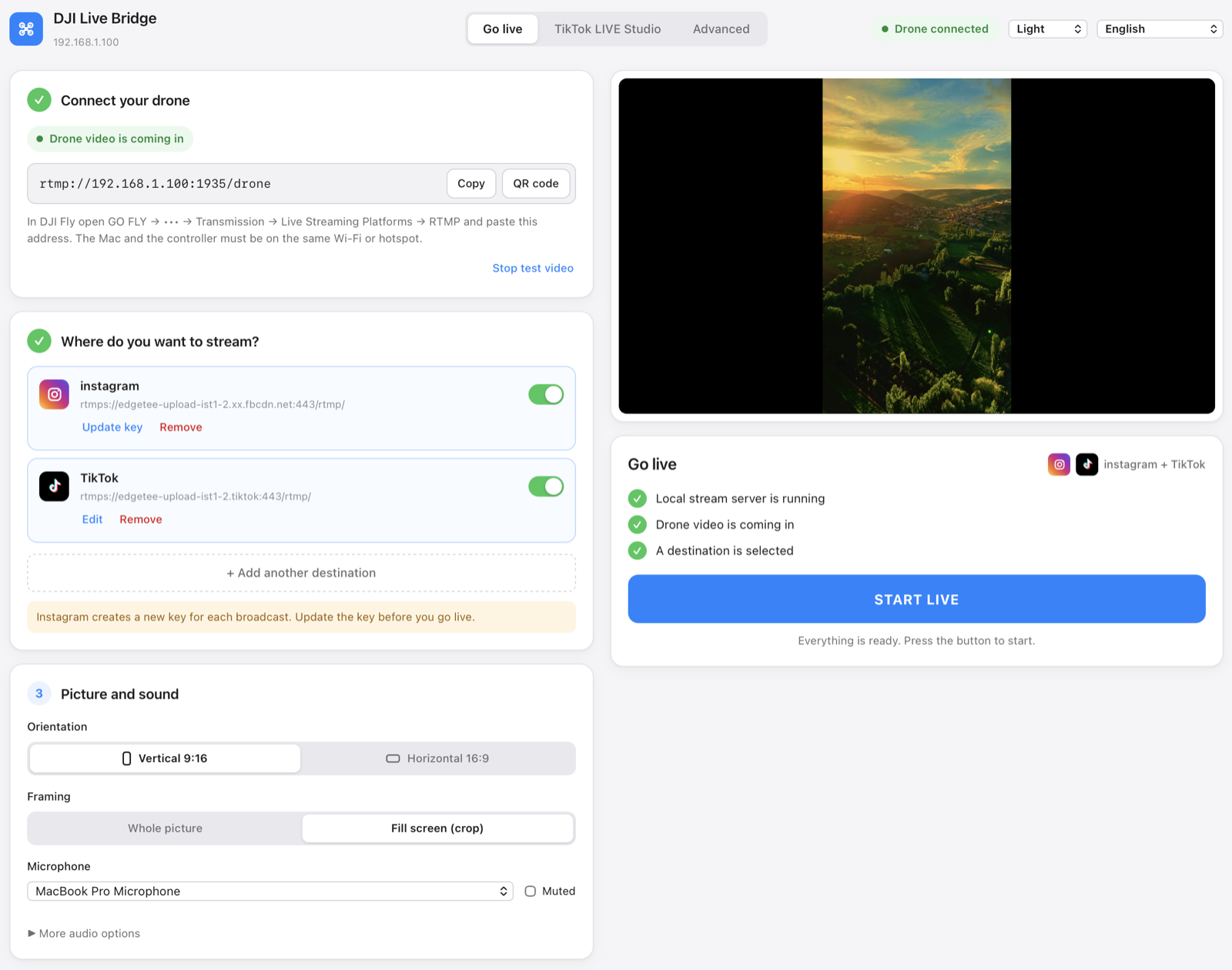
- Open DJI Live BridgeInstall DJI Live Bridge on a Mac or Windows PC and note the address it shows, like
rtmp://192.168.1.20:1935/drone. - Connect the camera in DJI MimoUpdate DJI Mimo and the camera firmware, connect the Osmo Action and open the livestream option.
- Choose RTMP and the Wi-FiSelect RTMP and the Wi-Fi the camera should join — the computer's network, or a phone hotspot that the computer also uses.
- Enter the address and startType the address from DJI Live Bridge, pick 1080p and the highest bitrate the network holds, and start. The preview appears in the app.
- Add platforms and go liveAdd Instagram, TikTok, YouTube, Twitch or any RTMP server and press START LIVE.
Other DJI cameras with RTMP livestreaming are listed in the Osmo cameras guide.
Where an action camera live stream shines
- Sports and rides. Cycling, motorbike, skiing or running — one point of view, live on several platforms.
- Behind the scenes. Mount the camera on a set or a workshop wall and stream while you work.
- A second angle. Use the virtual camera to add the Osmo Action as a wireless source in OBS next to your main camera — see the webcam guide.
- Weather-proof streams. The camera handles rain and dust; the computer stays dry in the car or the tent.
Range and network
The camera sends its stream over Wi-Fi to the computer, so it has to stay within reach of that network. For moving shots, a phone hotspot carried close to the camera — with the computer on the same hotspot — keeps the link short. The upload to the platforms then uses the hotspot's mobile data, about 6 Mbps per destination.
| Setup | Good for |
|---|---|
| Home or venue Wi-Fi | Fixed angles, workshops, events |
| Phone hotspot near the camera and computer | Outdoor shoots and short moving shots |
| Travel router in a car or van | Rides where the computer travels with you |
When it does not work
- The camera cannot connect: it is not on the computer's network, or a guest network isolates devices.
- The stream drops while moving: the camera left the Wi-Fi's range; keep the hotspot closer or lower the bitrate.
- No livestream option: update DJI Mimo to 1.2.20 or later and the camera firmware.
- Instagram rejects the stream: create a new live video on instagram.com and update the key; each key works once.
Questions
Can the Osmo Action 5 Pro live stream to Instagram?
Not from DJI Mimo alone. Stream to DJI Live Bridge over RTMP and it forwards the picture to Instagram over RTMPS.
Which Osmo Action cameras support RTMP livestreaming?
Per DJI: Osmo Action 6, 5 Pro, 4 and 3, DJI Action 2 and the first Osmo Action (720p at most).
Can I stream an Osmo Action to Twitch and YouTube at the same time?
Yes. Add both destinations in DJI Live Bridge and press START LIVE.
How far can the camera be from the computer?
As far as the Wi-Fi reaches. The camera streams to the computer over that network, so keep it within range or carry a hotspot.
Try it with your drone
DJI Live Bridge is free and open source, for macOS and Windows. FFmpeg is built in, so there is nothing else to install.
More guides
How to live stream a DJI Mini 5 Pro
Live stream a DJI Mini 5 Pro with RC 2 or RC-N3. Set up DJI Fly RTMP, use a phone or computer, and send your drone feed to YouTube, Instagram or Facebook.
How to live stream a DJI Mini 4 Pro
Live stream a DJI Mini 4 Pro using RC 2 or RC-N2. Follow phone and computer setup, DJI Fly RTMP settings, microphone requirements and platform checks.
Spot and count animals live from your DJI drone
DJI Live Bridge spots goats, sheep, cows, horses, donkeys and poultry in your drone's live picture, marks them on the stream and counts them, all on your own computer.
DJI Fly RTMP live streaming: the complete setup
How to set up RTMP live streaming in DJI Fly: where the setting is, which address to enter, how to network the controller and computer, and how to fix it.
Why DJI Fly can't live stream to Instagram (and the fix)
DJI Fly has no Instagram option and its RTMP client cannot do the encrypted RTMPS Instagram requires. Here is why, and how to go live on Instagram from a DJI drone anyway.
Turn your DJI drone into your computer's webcam
Turn your DJI drone into a webcam for TikTok LIVE Studio, OBS, Zoom, Google Meet or Teams with the DJI Live Bridge virtual camera. Setup, ideas and fixes.
How to live stream a DJI Neo
How to live stream a DJI Neo: which control mode works (phone, RC-N3, goggles), RTMP in DJI Fly, and going live on Instagram, TikTok or YouTube with DJI Live Bridge.
How to live stream a DJI Avata 2
How to live stream FPV footage from a DJI Avata 2: share the Goggles 3 view to DJI Fly on your phone, stream over RTMP and go live on Instagram, TikTok or YouTube.
Live stream your DJI Osmo camera to Instagram, TikTok and more
DJI Mimo can stream Osmo Action, Osmo Pocket and Osmo 360 cameras over RTMP. Send that to DJI Live Bridge to go live on Instagram, TikTok and YouTube at once.
How to live stream an Osmo Pocket 3 to Instagram and TikTok
How to live stream a DJI Osmo Pocket 3 over RTMP from DJI Mimo to Instagram, TikTok and YouTube at once, and use it as a wireless webcam, with DJI Live Bridge.
How to go live on TikTok with a DJI drone
Stream a DJI drone live on TikTok from DJI Fly: with a TikTok stream key, or without one through TikTok LIVE Studio and a virtual camera. Settings and fixes.
How to go live on Instagram with a DJI drone
Go live on Instagram from a DJI drone: get the stream URL and key on instagram.com, send DJI Fly's RTMP stream through DJI Live Bridge, then press Go live.
How to live stream a DJI drone to YouTube
Stream a DJI drone live to YouTube: enable live streaming, copy the stream key from YouTube Studio, send DJI Fly's RTMP through DJI Live Bridge. Settings and tips.
How to go live on Facebook with a DJI drone
Stream a DJI drone live on Facebook: get the RTMPS server URL and stream key from Live Producer, send DJI Fly's stream through DJI Live Bridge, and go live.
How to stream a DJI drone on Twitch
Stream a DJI drone live on Twitch: copy your stream key from the Creator Dashboard, add Twitch as a custom RTMP destination in DJI Live Bridge and go live.
How to stream a DJI drone on Kick
Stream a DJI drone live on Kick: copy the stream URL and key from the Kick dashboard, add them as a custom RTMP destination in DJI Live Bridge, and go live.
Stream a DJI drone to several platforms at once
Send one DJI drone live stream to TikTok, Instagram, YouTube, Facebook, Twitch and Kick at the same time with DJI Live Bridge — free, local, no restream service.
DJI Live Bridge vs Restream: which one for your drone?
Streaming a DJI drone to several platforms: Restream's cloud relay or DJI Live Bridge on your own computer? Cost, watermark, Instagram, vertical video and when each one wins.
Stream a DJI drone without setting up NGINX and OBS
The usual way to get DJI Fly into OBS is an NGINX RTMP server, a config file and a media source. Here is what that setup involves, and the one-app way to skip it.