 DJI Live Bridge
Stream a DJI drone without setting up NGINX and OBS
Search for how to get a DJI drone into OBS and most guides start the same way: install an NGINX RTMP server, edit its config, open the firewall, point DJI Fly at it and pull the stream into OBS as a media source. It works, but it is a small server project. DJI Live Bridge puts the RTMP server, the preview, the encoding and the platform outputs in one app — and can still hand the picture to OBS when you want it.
In short
- The classic recipe is DJI Fly → NGINX with the RTMP module → OBS media source → one platform.
- It means installing a server, editing nginx.conf, allowing port 1935 and building a scene by hand.
- Several platforms at once needs an OBS plugin or a cloud service; a vertical canvas needs more setup.
- DJI Live Bridge receives DJI Fly directly and streams to several platforms, vertical or horizontal, with nothing else installed.
- If you want OBS anyway, Prepare OBS scene builds a DJI LIVE scene with the drone feed for you.
The usual NGINX + OBS recipe
- Install an RTMP serverNGINX with the RTMP module (on Windows often a prebuilt bundle), or another RTMP server.
- Edit the configurationAdd an
rtmpblock with an application such asliveto nginx.conf and start the server. - Open the firewallAllow incoming connections on port 1935 and find the computer's local address.
- Point DJI Fly at itEnter something like
rtmp://192.168.1.20/live/droneunder Live Streaming Platforms → RTMP. - Pull it into OBSAdd a Media Source with the same address, size it on the canvas, then set OBS's stream URL and key for your platform.
After that, every change is manual: a new network means a new address, a second platform means a plugin or a relay service, and a vertical stream means a second canvas or a separate profile.
What DJI Live Bridge replaces
| Task | NGINX + OBS | DJI Live Bridge |
|---|---|---|
| RTMP server for DJI Fly | Install and configure NGINX | Built in; the address is shown with a QR code |
| Preview of the drone | OBS media source | Built in, with resolution and bitrate |
| Several platforms at once | Plugin or cloud service | Built in |
| Instagram (RTMPS) | OBS can send RTMPS to one destination | Built in, alongside the others |
| Vertical 1080×1920 | Build a vertical canvas | One switch, with a blurred fill |
| TikTok without a stream key | OBS Virtual Camera + LIVE Studio | Built-in virtual camera |
| Stream keys | In OBS's settings | In the system's credential vault |
The one-app setup
- Install DJI Live BridgeDownload it for macOS or Windows; FFmpeg and the media server are inside.
- Copy the address into DJI FlyThe app shows an address like
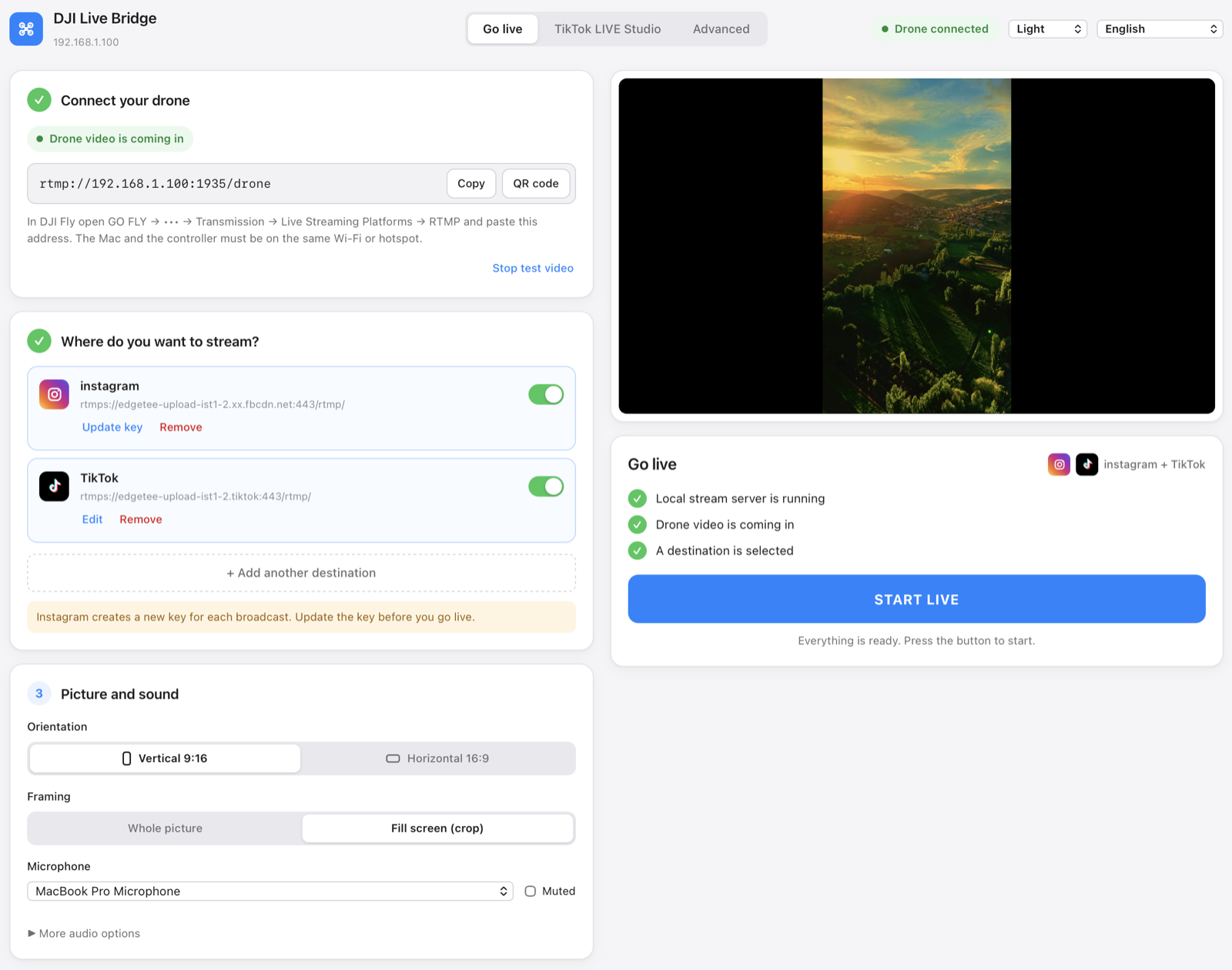
rtmp://192.168.1.20:1935/drone. Enter it in DJI Fly under GO FLY → ••• → Transmission → Live Streaming Platforms → RTMP. - Add your platformsInstagram, TikTok, YouTube, Facebook, Twitch, Kick or any RTMP server, each with its URL and key.
- Press START LIVEThe picture is encoded once and sent to every enabled destination.
When you still want OBS
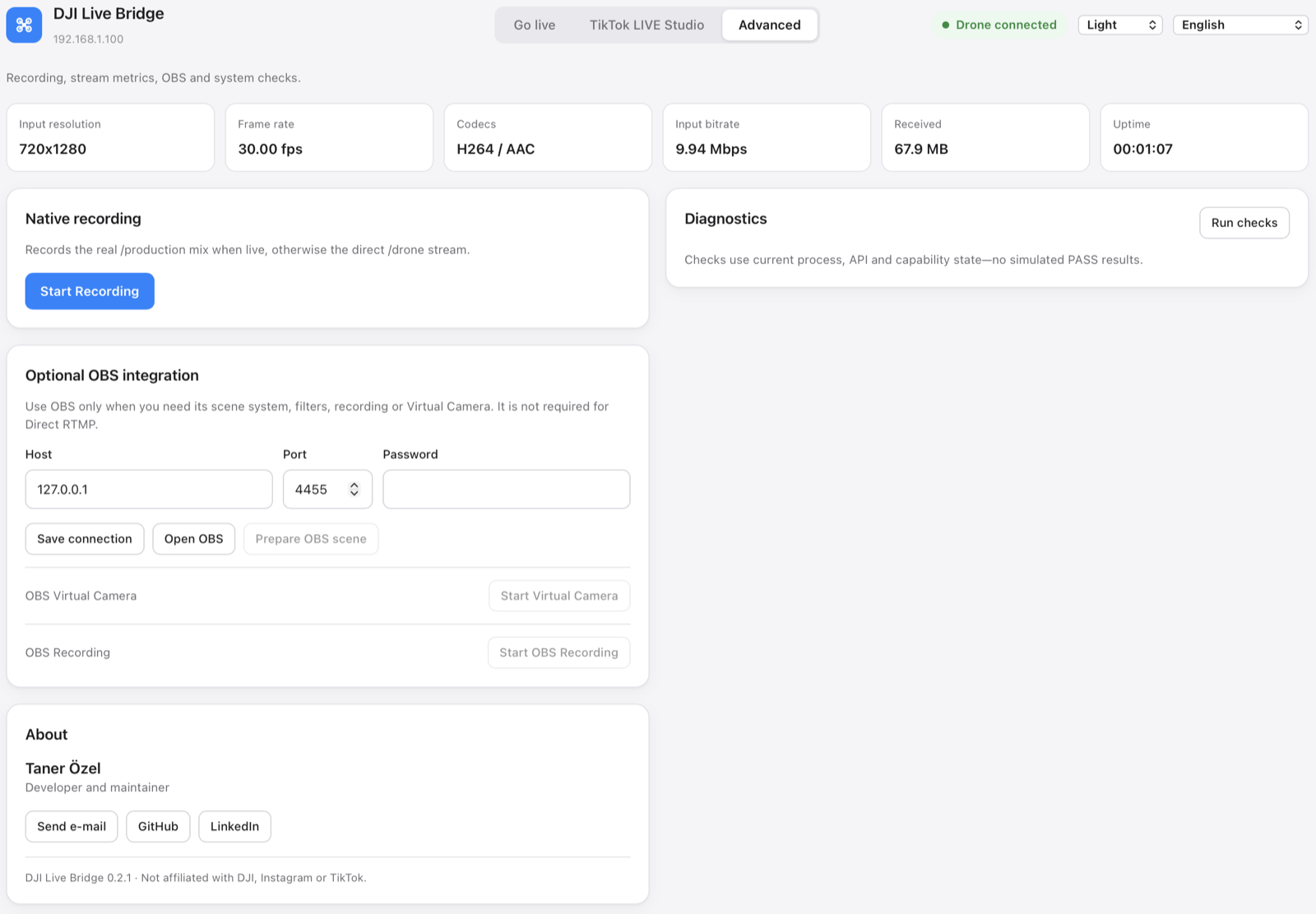
OBS is unbeatable for scenes, overlays and transitions. DJI Live Bridge does not replace that — it replaces the NGINX part. Enable OBS WebSocket (Tools → WebSocket Server Settings), connect it in the app's Advanced tab and press Prepare OBS scene: the app creates a scene named DJI LIVE with the drone feed already in it, sized to a horizontal or vertical canvas.
For calls in Zoom, Meet or Teams through OBS Virtual Camera, see the webcam guide.
Questions
Do I need NGINX to stream a DJI drone to OBS?
No. DJI Live Bridge contains its own RTMP server; with Prepare OBS scene it also puts the drone feed into OBS without NGINX.
Do I need OBS to stream a DJI drone?
No. DJI Live Bridge streams to Instagram, TikTok, YouTube and other platforms directly. OBS is optional for scenes and overlays.
Is the NGINX method worse?
It works and is flexible, but you maintain a server, a config file and an OBS scene yourself, and multistreaming or vertical video need extra steps.
What does DJI Live Bridge cost?
Nothing. It is free and open source under the MIT licence.
Try it with your drone
DJI Live Bridge is free and open source, for macOS and Windows. FFmpeg is built in, so there is nothing else to install.
More guides
How to live stream a DJI Mini 5 Pro
Live stream a DJI Mini 5 Pro with RC 2 or RC-N3. Set up DJI Fly RTMP, use a phone or computer, and send your drone feed to YouTube, Instagram or Facebook.
How to live stream a DJI Mini 4 Pro
Live stream a DJI Mini 4 Pro using RC 2 or RC-N2. Follow phone and computer setup, DJI Fly RTMP settings, microphone requirements and platform checks.
Spot and count animals live from your DJI drone
DJI Live Bridge spots goats, sheep, cows, horses, donkeys and poultry in your drone's live picture, marks them on the stream and counts them, all on your own computer.
DJI Fly RTMP live streaming: the complete setup
How to set up RTMP live streaming in DJI Fly: where the setting is, which address to enter, how to network the controller and computer, and how to fix it.
Why DJI Fly can't live stream to Instagram (and the fix)
DJI Fly has no Instagram option and its RTMP client cannot do the encrypted RTMPS Instagram requires. Here is why, and how to go live on Instagram from a DJI drone anyway.
Turn your DJI drone into your computer's webcam
Turn your DJI drone into a webcam for TikTok LIVE Studio, OBS, Zoom, Google Meet or Teams with the DJI Live Bridge virtual camera. Setup, ideas and fixes.
How to live stream a DJI Neo
How to live stream a DJI Neo: which control mode works (phone, RC-N3, goggles), RTMP in DJI Fly, and going live on Instagram, TikTok or YouTube with DJI Live Bridge.
How to live stream a DJI Avata 2
How to live stream FPV footage from a DJI Avata 2: share the Goggles 3 view to DJI Fly on your phone, stream over RTMP and go live on Instagram, TikTok or YouTube.
Live stream your DJI Osmo camera to Instagram, TikTok and more
DJI Mimo can stream Osmo Action, Osmo Pocket and Osmo 360 cameras over RTMP. Send that to DJI Live Bridge to go live on Instagram, TikTok and YouTube at once.
How to live stream an Osmo Pocket 3 to Instagram and TikTok
How to live stream a DJI Osmo Pocket 3 over RTMP from DJI Mimo to Instagram, TikTok and YouTube at once, and use it as a wireless webcam, with DJI Live Bridge.
How to live stream an Osmo Action camera to Instagram and TikTok
Live stream a DJI Osmo Action 6, 5 Pro, 4 or 3 over RTMP from DJI Mimo to Instagram, TikTok, YouTube and Twitch at once with DJI Live Bridge. Setup and settings.
How to go live on TikTok with a DJI drone
Stream a DJI drone live on TikTok from DJI Fly: with a TikTok stream key, or without one through TikTok LIVE Studio and a virtual camera. Settings and fixes.
How to go live on Instagram with a DJI drone
Go live on Instagram from a DJI drone: get the stream URL and key on instagram.com, send DJI Fly's RTMP stream through DJI Live Bridge, then press Go live.
How to live stream a DJI drone to YouTube
Stream a DJI drone live to YouTube: enable live streaming, copy the stream key from YouTube Studio, send DJI Fly's RTMP through DJI Live Bridge. Settings and tips.
How to go live on Facebook with a DJI drone
Stream a DJI drone live on Facebook: get the RTMPS server URL and stream key from Live Producer, send DJI Fly's stream through DJI Live Bridge, and go live.
How to stream a DJI drone on Twitch
Stream a DJI drone live on Twitch: copy your stream key from the Creator Dashboard, add Twitch as a custom RTMP destination in DJI Live Bridge and go live.
How to stream a DJI drone on Kick
Stream a DJI drone live on Kick: copy the stream URL and key from the Kick dashboard, add them as a custom RTMP destination in DJI Live Bridge, and go live.
Stream a DJI drone to several platforms at once
Send one DJI drone live stream to TikTok, Instagram, YouTube, Facebook, Twitch and Kick at the same time with DJI Live Bridge — free, local, no restream service.
DJI Live Bridge vs Restream: which one for your drone?
Streaming a DJI drone to several platforms: Restream's cloud relay or DJI Live Bridge on your own computer? Cost, watermark, Instagram, vertical video and when each one wins.